This page is only intended for people who have signed up to the online retreat
Zoom Link
You will have received an email from zoom with a personal zoom link. Please use this to join the retreat. If you cannot find your email, please search for an email with subject: “Freedom from Clinging” Online Retreat – Confirmation
Contact Vajrapriya if you cannot find it.
Joining Instructions
Please read these joining instruction.
Practice Reviews
There are a limited number of review slots, and you are welcome to sign up for one if you wish, with either Vajradevi or Vajrapriya: click on the appropriate link below.
When the time comes for your review, click on “Zoom review with …” a few minutes early. You will probably arrive in a “waiting room”. Please wait to be let in – your reviewer will know you are there.
(See bottom of page if you prefer to join zoom using the meeting number and passcode)
Recordings
Videos of the sessions will appear here around one hour after each session. They will be split into segments with input and led practice separated:
You can find all Vajradevi’s videos at tiny.cc/vajradevi-vids
We will additionally make available recordings of the led meditations, which can be downloaded onto your own device, or dropbox folder.
Please don’t share any of these recordings, video or audio, with anyone outside the retreat without Vajradevi’s permission.
Note: in order to download Dropbox files, you don’t need to sign up for Dropbox, despite their strong encouragement!
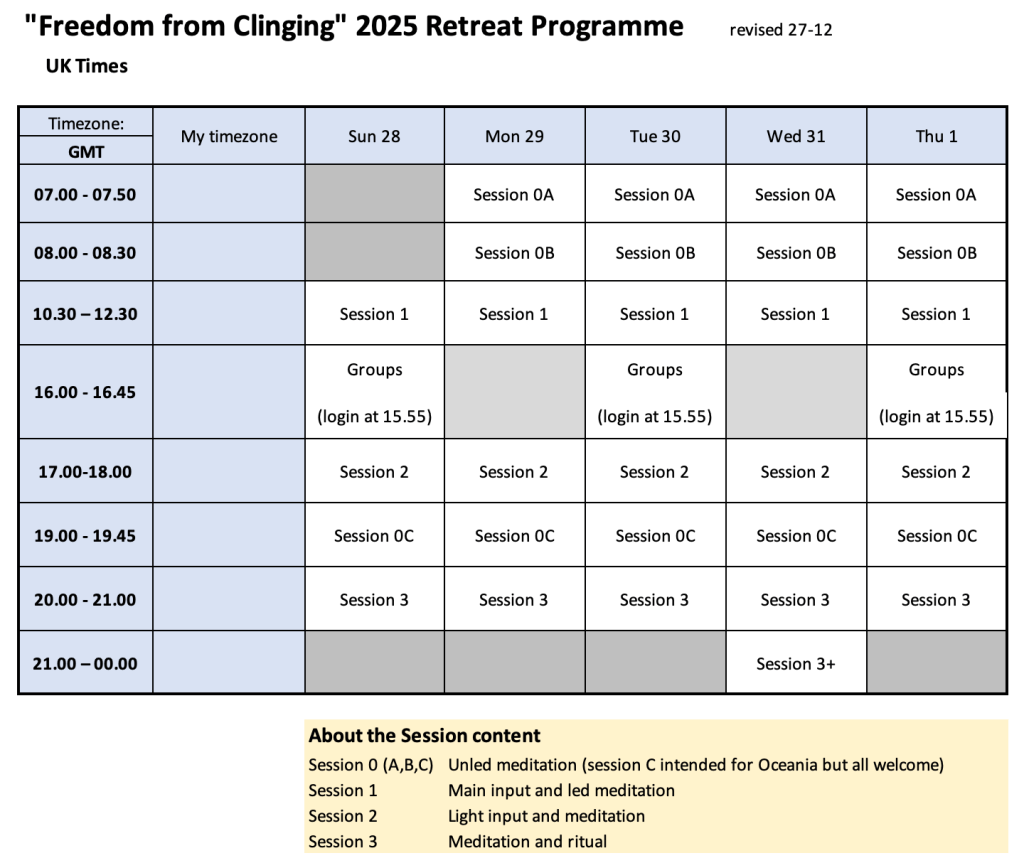
Programme
Please note the new programme below, revised 27/12. The sessions from 16.00 onwards are all 30 minutes later. These match the timings given on the booking page.
Resources, Announcements and Messages
Check for readings, resources, messages, and leave messages at this pinboard:
If you need any practical help, you can email Vajrapriya, or phone him on +44 7770 566642
Donations to Vajradevi
Give via paypal or credit / debit card at this link:
www.tiny.cc/give-to-vajradevi
You can also give by direct bank transfer (which reduces charges) in 3 currencies: GBP, EUR or AUD. Details are below:
GBP account details:
Name: K Lambert
Bank: Lloyds Bank
Sort Code: 30-98-41
Account Number: 00086178
AUD account details:
Account holder: Karen Louise Lambert
Bank: Wise
BSB code: 774001
Account number: 211126666
Swift/BIC: TRWIAUS1XXX
Wise’s address: Wise Australia Pty Ltd, Suite 1, Level 11, 66 Goulburn Street, Sydney NSW, 2000 Australia
NZD account details:
Account Holder: Karen Louise Lambert
Account Number: 04-2021-0278465-76
Swift/BIC: TRWINZ21XXX
Address: Wise Payments Ltd – NZ Branch, 1st floor, Worship Square, 65 Clifton St, London EC2A 4JE, UK
EUR account details:
Account holder: Karen Louise Lambert
Bank: Wise
BIC: TRWIBEB1XXX
IBAN: BE31 9670 7387 4455
Wise’s address: Wise, Rue de Trône 100, 3rd Floor, Brussels 1050 Belgium
Buy the book

Alternate joining information for Zoom meetings
If you prefer to use the zoom app for joining meetings rather than the links above, then here is the information you need.
| Meeting ID | Passcode | Numeric code for dial in | |
| MAIN ZOOM | use personal info | ||
| Reviews with… | |||
| Vajradevi | 792 4250 4919 | h0AnTb | 330538 |
| Vajrapriya | 875 2827 5303 | NT6mSd | 172780 |
Contact emails
Vajradevi: vajradevi@gmail.com
Vajrapriya: vajrapriya@gmail.com
 Uncontrived Mindfulness